
FILIPINA


with load balancers, private database, backups, and monitoring
— instantly expandable on the fly in case you get slashdotted.
Deploying your Rails application to a Morph AppSpace is a snap.
You create an account and then download a pre-configured Capistrano
recipe. Make a quick update of your SVN location and run the CAP command.
That’s it. Within a few minutes, your application is up and running,
ready for the world. (taken from Mor.ph)
I know you are quite familiar with Morph AppSpace
and this is just a quick simple steps on how to do deploy
your rails application in Morph.
1. Your are using Subversion in your Rails application,
if not refer to this post.
2. You need to have an existing Morph Account, if none
you can sign-up for free here.
3. You have already installed Capistrano.
4. Deploying should be done in Linux environment (currently)
*Updated: I first tried deploying the application using Windows but it had errors during deployment. Since I had Linux and the deployment in Linux is pretty sweet with no errors at all, that's why I assumed it won't work for Windows.
But hey am wrong hehehe :) you need to tweak things in Windows (as usual) to make it work.
1. Go to Morph Panel and create a new subscription

2. Click "Create Data Base". This will create an initial database setup
for your application.
3. Click "Download CAP File". This is the pre-configured Capistrano recipe
that Morph created for deploying your rails application.

4. Update the CAP(Capistrano) file, by setting your repository location.
e.g.
set :repository, nil => set :repository, 'http://svn.exist.com/svn/railsapp/trunk'
5. Run the CAP file.
>> cap -f morph_deploy.rb morph:deploy
a. This will get the application's code in svn.
b. If prompted for Morph Authentication, enter your Morph username/password.
c. Then this will upload the code in a S3.
d. If message is "Code upload is Done", your application is now ready for the world.
You can access it using the domain you specified in your subscription.
e.g http://your_apps_domain.morphexchange.com/
Your rails application is now available 24/7 via Morph AppSpace! 

>> rake simple_captcha:setup_old)
3. Then do the migration.
>> rake db:migrate
4. Add this line of code to you config/routes.rb
map.simple_captcha '/simple_captcha/:action', :controller => 'simple_captcha'
5. Add this line in the file app/controllers/application.rb
include SimpleCaptcha::ControllerHelpers
6. In your view add:
<%= show_simple_captcha(:object=>"user") %>
:label
provides the custom below the image, default is “(type the code from the image)”
:image_style
Provides the specific image style for the captcha image.
There are eight different styles available with the plugin as…
Default is ’simply_blye’
You can also specify ‘random’ to select the random image style.
:distortion
Handles the complexity of the image. The :distortion can be set to ‘low’, ‘medium’
or ‘high’. Default is ‘low’.
:code_type
Handles the text of the captcha image. Available options are ‘numeric’ or ‘alphabetic’.
Default is ‘alphabetic’.
:object
the name of the object of the model class, to implement the model based captcha.
How to change the CSS for SimpleCaptcha DOM elements ?
You can change the CSS of the SimpleCaptcha DOM elements as per your need in this file…
For Rails >= 2.0 the partial view file wiil reside as…
“/app/views/simple_captcha/_simple_captcha.erb”
For Rails <>

hehehe it should have been RoR first day!
yep, April 25 or simply put today was the first day
of the RoR training.
Ms Mafe (blooming in her white attire) opened the training
with the trainee's RoR training expectations (taken from the survey) and there are lots of them,
(take note it's an intensive training so better fasten your seat belt!)
and of course there are managament's expectations too.
Then Ms. Jackie gives us the training schedule, topics
to be discussed, and the RoR gurus that would share their knowledge throughout the training.
Finally Stephen (a.k.a Popol, formal mode  ) takes the stage.
He is our first instructor for Ruby Basics and that would be Ruby Background.
He give us a brief history on how Ruby was conceived in the world.
Tiny bits of Ruby history:
The Semantics and Features of Ruby:
Ruby is object oriented - every data type is an object (classes and types which other languages designate as primitives).
It has support for introspection, reflection and metaprogramming, as well as interpreter-based threads,
dynamic typing, and parametric polymorphism.
The Ruby Philosophies:
(Stephen said this can guide you if Ruby is meant for you in the long run.)
* Ruby is designed for programmer productivity and fun,
following the principles of good user interface design.
The systems design needs to emphasize human, rather
than computer needs.
*It follows the principle of least surprise (POLS),
meaning that the language should behave in such a way
as to minimize confusion for experienced users.
As Stephen discusses these things in reality there are things
that are going on in the background.
(I know what your thinking but it isn't what I mean.)
We (the trainees) are actually setting up the environment needed.
Good thing I have everything set up but unfortunately I have to change my Rails
version to a lower version. :(
After losing connection from time to time, I guess almost everyone
had installed Ruby, Rails, and Aptana as our IDE (this am not sure).
Yeah, their are questions and Stephen answered everything quite well.
He also showed us some simple tricks, that is changing the state of an object.
Since in Ruby each objects knows its own state.
So if you know you know your state you can play around with it right?
I somewhat got interested with "final" objects that are supposed to be
final but still Ruby can get his hands on. lol Yes, Stephen clarifies that
Ruby has a power to freeze and unfreeze (final) objects!
The more interesting part is metaprogramming.
Metaprogramming is writing programs that write programs.
Analogy: "Writing Ruby that can write Ruby."
The Lunch 'N Learn session really did not start with that line, but that is the most important guideline in refactoring.
Every Lunch 'N Learn Sessions is something to look forward to hmmmm free lunch? Well you may think it is but there is something more to it, lots of ideas were shared during these small talks from the Exist Gurus and this time it's one of Exist best, Ms. Deng.
What is Refactoring? Ms. Deng, gives quite an opening through asking a question.
Everybody seems dumbstruck, well maybe because it's the first time that the participants are being asked early in the discussion even before they can do so or they are just quiet familiar with the word or they're full of ideas? I bet they have been refactoring all there programming life, everybody does right?
What really is Refactoring?
Refactoring is a disciplined technique for restructuring an existing body of code, altering its internal structure without changing its external behavior.
Its heart is a series of small behavior preserving transformations. Each transformation (called a 'refactoring') does little, but a sequence of transformations can produce a significant restructuring.
Why should you refactor?
– Refactoring improves the design of software
– Refactoring makes software easier to understand
– Refactoring helps you find bugs
– Refactoring helps you program faster
But when should you refactor?
– Refactor when you add a function
– Refactor when you need to fix a bug
– Refactor when you do a code review
In short refactor when your system changes otherwise its pointless, refactoring a changing software so it can be easily changed in the future gives you a payback.
Take note when you refactor you should also test, testing is very important underpinning to refactoring, as Fowler says:
“Think of it as walking a tightrope without a net. If you are good at walking a tightrope, and it's not that high up, then you might try it. But if you've never walked a tightrope before, and it's over Niagara Falls, you probably want a good net.”
Code smells or code that smells bad.
Listed above are just the 22 code smells, but there are 73 code smell refactorings in 7 categories.
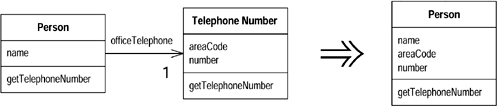
A class that isn't doing enough to pay for itself should be eliminated. A class isn't doing very much.
Move all its features into another class and delete it. Useless components are subjected to Inline Class.
You have a class that is doing too much work, at least in part through many conditional statements.
Create a hierarchy of classes in which each subclass represents a special case.

For more on refactoring read:
Refactoring:Improving the Design of Existing Code by Martin Fowler
“Any fool can write code that a computer can understand. Good programmers write code that humans can understand.”
Tomorrow, March 13, 2008 (Thursday), MySpace will be
having a DevJam, a soft launch for its 3rd party social
applications which uses OpenSocial API. A week before the
said soft launch an uproar occurs, the current platform
supports OpenSocial API 0.6 but most of the developers
wants MySpace to support OpenSocial API 0.7 which Google
releases on the same date MDP goes live to
developers. And they go as far as creating a poll to
let developers have a say whether to support v0.7 later
and continue with v0.6 or support it now.
OpenSocial v0.6 and 0.7 has viral changes.
In 0.6 there is only one package, the "opensocial.*" package.
In 0.7, the packages includes: opensocial, gadgets(core), and gadgets(feature-specific).
Days before the soft launch OpenSocial 0.7 goes Live!
Every developers are burning their candles for tomorrows event!
The MySpace Developer Platform is a combination of services that provides third party application developers with hooks into MySpace's data and functionality. These services include:
OpenSocial and the MySpace Developer Platform are a series of JavaScript and server-side components that work together to provide you with a standard interface to write your apps against.
Your app is hosted in an IFrame and your code has a reference first to "opensocialreference.js", then to "MyOpenSpace.js"
MyOpenSpace.js is dependent on opensocialreference.js.
OpenSocial defines several basic social networking objects, as well as implementations for how to get and update those objects.
MyOpenSpace maps those objects to MySpace server-side API calls and it also extends the objects.
The following code is the official OpenSocial request for the friends of the "Owner" (the person who has installed the application):
function init()
{
 var dataRequest = opensocial.newDataRequest();

 //Create a request for the owner's friends
    var friendRequest = dataRequest.newFetchPeopleRequest(opensocial.DataRequest.Group.OWNER_FRIENDS);
 //Add the request for processing.
    dataRequest.add(friendRequest);
 //Send the request, passing in a callback.
    dataRequest.send(response);

}
As for the famous wikipedia:
Shindig refers to any sort of clever party, covered dish gathering, box social, a brawl, or it can refer to a dance party with lots of music.
Well, we are not talking of dance parties or music here and not about brawl either. Now I wonder why they named the project Shindig?
Shindig is an open source project in the Apache Software Foundation incubator which began in December, 2007, to provide an open source implementation of the OpenSocial specification and gadgets specification.
The software contains both server-side and client-side code. Once the project is mature, an installation of this product will be capable of rendering OpenSocial gadgets in a web browser.
Shindig's goal is to allow new sites to start hosting social applications under an hour's worth of work.
An hour's work? Now that is quite handy and useful guys!
Lets get going...
The architectural components of Shindig:
Gadget Container JavaScript -- core JavaScript foundation for general gadget functionality. This JavaScript manages security, communication, UI layout, and feature extensions, such as the OpenSocial API.
Gadget Server -- an open source version of gmodules.com, which is used to render the gadget xml into JavaScript and HTML for the container to expose via the container JavaScript.
OpenSocial Container JavaScript -- JavaScript environment that sits on top of the Gadget Container JS and provides OpenSocial specific functionality (profiles, friends, activities).
OpenSocial Gateway Server -- an open source implementation of the server interface to container-specific information, including the OpenSocial REST APIs, with clear extension points so others can connect it to their own backends.
The Gadget Container JavaScript provides code to generate IFRAMES pointing to gmodules.com, offers some basic gadgets functionality (e.g. dynamic height), a layout manager, the edit dialog box, a cookie-based user preferences store, and an option to point IFRAMES at your Gadget Server instance instead of gmodules.com.
The initial Gadget Server written in Java provides extensible scaffolding for processing gadgets: retrieving XML, parsing it, and processing it into a form that allows rendering of the gadget to a user or retrieval of its metadata.
The initial contribution of the Gadget Server was written in Java, Shindig is language neutral. Ning is planning to contribute an initial version of a PHP Gadget Server, and rumors of C#, Perl, and Ruby.
Currently they do not have an automated builds infrastructure set up to offer periodic builds yet, but it will be available soon.
The following steps provide useful information on how to build and run Shindig.
Prequisites
Get the code
Build and run the code (with Maven)
Setting up an Eclipse project
Running with Caja
In order to build Shindig, you must have the following:
Java (JDK/JRE) 1.5 or later installed on your system and the JAVA_HOME environment variable set.
See: http://java.sun.com/ for installation instructions.
A Subversion client installed in order to checkout the code.
Instructions for downloading and installing Subversion can be found here: http://subversion.tigris.org/
Apache Maven installed to perform the build.
Instructions for downloading and installing Maven can be found here: http://maven.apache.org/download.html
Create a subdirectory and checkout the Shindig code from its Subversion repository
mkdir ~/src/shindig (or wherever you'd like to put it)
cd ~/src/shindig
svn co http://svn.apache.org/repos/asf/incubator/shindig/trunk/ .
To build a Web Archive (WAR) file for the Gadget server and run tests, perform the following:
Make sure you have the prerequisites installed first.
cd ~/src/shindig/java/gadgets
mvn package
Once the build successfully completes, you can install the built WAR file (gadgets.war) located in the /target subdirectory onto your JEE server.
To build the code (with no tests) and start a Jetty server that will run on at localhost:8080:
mvn jetty:run-war
To run the Jetty server on a different port, use:
mvn -Djetty.port=
Once you've either installed the WAR file on your JEE server, or are running locally using the Jetty server, you can test the Gadget server using:
http://localhost:
These steps, after completing the previous section, will allow you to build from within Eclipse using the Maven2 plugin. You should first install the Maven plugin, then create the new Java project.
Create ~/.m2/settings.xml consisting solely of
Install the Maven2 plugin
Help -> Software Updates -> Find and Install
Search for new features to install
Create a new remote update site for the Maven 2 plugin
Name: Maven2 - Codehaus
Select the site and click "Finish"
Select only the Maven Integration plug-in (mylyn and subclipse integration have other dependencies.)
Complete the installation
Setup new workspace and project
Creating a new workspace eliminates the performance cost from existing projects and makes it easier to manage the code.
File -> Switch Workspace -> Other...
Select directory to store workspace
Do not select a parent directory of the shindig source (e.g. ~/src/shindig) as Eclipse won't allow you to create the Java project.
Something like ~/eclipse/workspaces/shindig would work fine
File -> New -> Java Project
Select 'Create project from existing source' and navigate to:
~/src/shindig/java/gadgets
Click Finish
If you see a dialog for "Open Associated Perspective", click Ok. Don't worry about the errors after loading as they will be fixed in the next step.
Right-click the project, select Maven : Enable Dependency Management
Right-click the project, select Maven : Update Source Folders
Caja is an important part of OpenSocial that greatly enhances JavaScript security. Caja is managed in a separate open source project hosted by Google code projects. For more information on Caja, see: http://code.google.com/p/google-caja/wiki/CajaEasyIntro
Load this page: http://localhost:8080/gadgets/samplecontainer/samplecontainer.html
Point it to this gadget: http://hosting.gmodules.com/ig/gadgets/file/117247905274371511495/SocialHelloWorld.xml
To see the cajoled code (Firefox only), right-click inside the iframe and do "This Frame -> View Frame Source"
Want some challenge?
Google Android has something right for you...
Google has launched the Android Developer Challenge, of $10 million in awards for great and cool mobile applications built on the Android platform.
The award money will be distributed equally between two Android Developer Challenges:
Android Developer Challenge I: Submissions from January 2 through April 14, 2008
Android Developer Challenge II: This part will launch after the first handsets built on the platform become available in the second half of 2008
All types of applications are accepted as long as it is innovative and useful applications that make use of Android's capabilities to deliver a better mobile experience.
Suggested areas of focus:
Social networking
Media consumption, management, editing, or sharing, e.g., photos
Productivity and collaboration such as email, IM, calendar, etc.
Gaming
News and information
Rethinking of traditional user interfaces
Use of mash-up functionality
Use of location-based services
Humanitarian benefits
Applications in service of global economic development
Whatever you're excited about!
Reference/s:
Google AndroidDifferent social networking sites proliferates these days, and well am one of those millions of users.
These are the social sites on my list:

Delicious a social bookmarking site.
You can access you bookmarks anywhere without your pc! You're no longer dependent in your own machine for the pages that you bookmarked with.

Twitter a micro-blogging site.
Twitter lets you update what you've been doing and letting your followers/friends know it and you will be updated of your friends too. Quite helpful if your following interesting people, you'll learn cool and interesting things in just a matter of seconds.
Another thing is tracking keywords in Twitter. Let's say your tracking google: “track google”. Just a simple entry but you IM goes ballistics! Whew! Imagine when you track google and each twitter user
around the globe who updates with the word google will be sent to you even if you're not friends. Quiet handy.  You can update using IM, Phone, Web, etc. You can use Twittr, Twitteriffic, Twitbin, TwitterFox, Twhirl, and lots of tools out there!
Facebook for network of friends/social graph, joining a cause, and usually I visit it for gaming.
Lots of 3rd party applications to play around with. Some are helpful some are nuances that requires you to invite your friends before seeing the actual application itself. Beware you're data in FaceBook will remain even if you will delete your account. Yeah, they will delete your account but your data is Archived which means its still available (for them to use maybe) but just deactivated.
YouTube
Well for videos YouTube is quite popular, though I use MySpaceTV sometimes.
Friendster
It needs further development but it's nice that they are adding 3rd party applications now. They are now supporting Google's OpenSocial.
Old friends are friendster users, well friendster is quite popular in the Philippines.
Lets you post pictures, bulletins, and giving testimonials or comments to friends. Spread some love! 
Hi5/Imeem
I usually use this sites for my music needs.
PageOnce
PageOnce is very useful if you have multiple email accounts and lots of social networking sites.
It will let you add all your accounts, so you can manage all your accounts in just one site. Great!
There are more social sites out there, connecting with your friends and learning sure brings the fun!
What Social Networking Sites are you using? Why?
